
Quick Answer
An applicant tracking system for small business keeps every opening, candidate, resume and interview in one place, so nothing is lost in WhatsApp, email or spreadsheets. It shows where each candidate stands and who is next to act.
You need one when you hire for several roles at once, receive resumes from many sources, or cannot say quickly where a candidate stands. If you hire only a few people a year, a simple spreadsheet may be enough.
Do you need an applicant tracking system for small business hiring?
Not always, but in small companies, the real question is rarely “which ATS?”. It is “have we outgrown the way we track hiring today?” A spreadsheet is probably enough if:
- you hire a handful of people a year, one role at a time;
- one person handles all hiring, and
- you remember every candidate’s status without looking it up.
An applicant tracking system for small business is worth considering if:
- you are hiring for two or more roles at the same time;
- resumes arrive on WhatsApp, email, job portals and referrals;
- more than one person interviews, and feedback sits in different places;
- you have lost a good candidate because nobody followed up; or
- you cannot answer “how many candidates are at the interview stage right now?” within a minute.
Not sure which list sounds like you? Take the one-minute test below. It gives you an honest answer, even if the answer is “not yet”.
1-minute test: do you need an applicant tracking system?
Signs you need an applicant tracking system for small business hiring
- Resumes live in five places. A candidate’s resume is in an email, their details in a chat and the interview note on a sticky.
- The same person is entered twice. Two recruiters speak to the same candidate and neither knows.
- Nobody knows the stage. The owner asks “what happened to that candidate?” and the answer takes ten minutes.
- Feedback is a gut feeling. Interviewers say “he seemed good” and there is nothing to compare.
- Old candidates are forgotten. A candidate who was almost right for last year’s role is not considered for this year’s.
- Hiring takes longer than it should, but you cannot see which stage slows it down.
These are not HR mistakes. They are what happens when a process built for two hires a year has to handle ten. Hiring is also the first step before onboarding, so lost records at this stage carry through to the next.
What an applicant tracking system for small business should do
You do not need a huge feature list. For a small company, these matter most:
- One place for every opening. Role, salary range, experience range, number of vacancies and required skills.
- One profile per candidate. If the same person applies for two roles, the history stays together.
- A clear pipeline. Stages such as screening, shortlisting, interviews, selection and rejection, with a status for each candidate.
- Resume reading. Upload a resume and have the details filled in, so nobody retypes them.
- Interview records. Who interviewed, when, and what each person scored.
- Skill-based scoring, so candidates can be compared on the same scale.
- Duplicate prevention, so the same application is not entered twice.
- A dashboard that shows how many candidates are at each stage.
What a small business usually does not need: complex workflows built for a recruiting department of fifty, heavy reporting nobody reads, and a setup that takes weeks.
What a simple hiring flow looks like in an applicant tracking system for small business hiring
- Create the position. Fix the role, vacancies, salary range, experience range and skills before you start. Everyone then hiring for the role works from the same definition.
- Collect resumes. From every source, into the same place.
- Screen. Review each resume and move it to shortlisted, rejected or on hold.
- Interview. Schedule each round and record who took it.
- Score. Each interviewer rates the skills that matter. The scores add up to one number per candidate.
- Decide. Mark the candidate OK to hire, rejected or pending review, and close the position when it is filled.
- Keep the record. Rejected candidates stay in your database for future roles.
An applicant tracking system for small business, built into your HRMS
Hiring does not end at the offer letter. The person you hire needs an onboarding record, an attendance and leave record, a salary and, one day, an exit. If hiring sits in one tool and everything else in another, you type the same details again at every step.
That is why Runtime treats hiring as one part of a single HRMS, not a separate product. Runtime’s applicant tracking system handles the first step, and the rest of the employee’s journey sits in the same system.
From first resume to first payslip
| Stage | What you do | Where it happens in Runtime |
|---|---|---|
| 1. Hire | Open a position, collect resumes, interview, score and select. | Runtime ATS |
| 2. Onboard | Collect joining details and documents for the selected candidate. | Employee Onboarding |
| 3. Attendance and leave | Record attendance, shifts and leave from the first day. | Time and Attendance |
| 4. Pay | Calculate salary, PF, ESI, Professional Tax and TDS from attendance and leave data. | Runtime Payroll |
| 5. Self-service | Employees see payslips and leave and raise requests themselves. | Runtime Workman |
What the hiring part does
- Position management. Set the salary range, experience range, vacancies and skills for each role, attach an evaluation template and close the position when it is filled.
- AI-assisted job descriptions. Draft the job description from within the system.
- Hiring pipeline. Candidates move through screening, shortlisting, interviews, selection and rejection, with statuses such as Shortlisted, OK to Hire, Rejected, Pending Review and On Hold.
- PDF resume reading. Upload a PDF resume and Runtime fills in the candidate’s details for you to check before saving.
- Interview management and scoring. Schedule rounds and record results. Interviewers rate each skill, and the ratings roll up into a score out of 100.
- One profile per candidate, duplicate prevention, and fields for source and notice period.
- Hiring dashboard, with reports for a date range.
Why one system matters when you choose an applicant tracking system for small business
- One record from candidate to employee. The details you collected at the interview are not typed again for onboarding.
- The joining date flows into attendance and payroll, so a new employee is not missing from the first salary run.
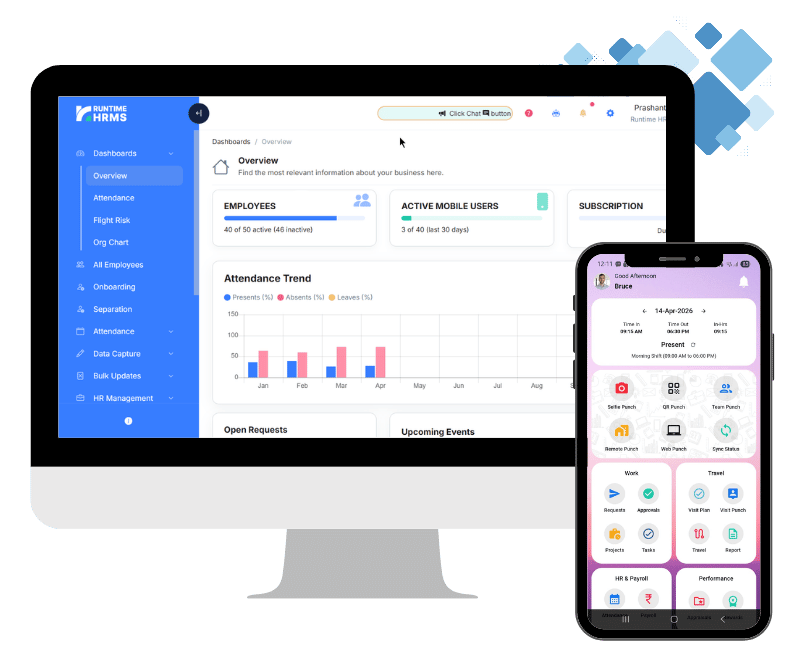
- One login, one place for the owner. You see hiring, attendance and payroll without switching tools or asking three people for three reports.
- Fewer mistakes at hand-over. Most small-company errors, such as a wrong joining date or a missed PF detail, happen when data is copied from one sheet to another.
Hire, onboard and pay your team in one system.
See how Runtime HRMS takes you from the first resume to the first payslip, with hiring, onboarding, attendance and payroll in one place.
Sign Up TodayFAQs
What is an applicant tracking system for small business?
It is software that keeps openings, candidates, resumes and interview results in one place, so a small company can see where every hire stands without searching through email and chat.
How much does an applicant tracking system for small business cost?
It depends on the plan and the number of employees. Check current plans on the pricing page, and compare the cost with the hours your team spends on hiring today.
Does a small business need an applicant tracking system?
Not if you hire a few people a year, one role at a time. It helps when you hire for several roles at once, get resumes from many sources or have more than one interviewer.
When should I move from Excel to an ATS?
When you lose track of candidates, enter the same person twice, cannot say quickly where someone stands or cannot compare interview feedback.