
Quick Answer
Payroll software for consultants should let you run payroll for many client companies without mixing their data or rules. With Runtime HRMS, each company gets its own account and licence, and you manage all of them from a single login.
You can also join the Runtime Partner Program free of charge and earn recurring commission on every company you onboard: 20% of the subscription in years 1 and 2, 10% in years 3 and 4, and 5% from year 5.
You run payroll for ten companies, and each one works differently
You run payroll for other people’s companies. One client has a day shift and a night shift. Another pays on the 5th, one on the 30th. A third sends attendance as a photo of a register, and a fourth has two branches with different holidays. Every month the same days get busy, and a new client adds another block of hours to the same days.
This guide on payroll software for consultants is for payroll consultants, HR consultants and outsourcing providers. It covers what makes multi-client payroll hard, what to look for in payroll software for consultants, and how the Runtime partner program lets you earn commission on top of your service fee. I am a director at Runtime HRMS, so I will be plain about what the program offers. I am not a lawyer or a CA, so check legal points with your own records.
Why running payroll for many companies is hard
If any of this sound familiar, the problem is not your skill. It is the way the work is set up, and it is the gap payroll software for consultants is built to close.
- Every client has its own rules. Different salary structures, leave rules, overtime and Professional Tax states. A template that works for one client breaks on the next.
- Client data arrives late and in every format. Photos, WhatsApp messages, Excel files with merged cells. The first days of the month go into converting data, not calculating pay.
- Month-end is a pile-up. All your clients need payroll in the same few days. One late client delays everyone.
- One mistake can cost you the client. A wrong PF wage or a missed ESI joiner reaches the client as a notice, and they blame you, not the software. See what to do on a PF or ESI notice.
- You are the helpdesk for every client’s employees. Payslip copies, bank-account changes, “why is this deduction here?”
- Growth means more hours, not more income. Each new client adds a fixed block of time. Beyond a point you either hire or decline.
What this costs you
Suppose you run payroll for 8 clients, and each takes 6 hours a month: collecting data, calculating, checking, sending payslips and filing. That is 48 hours a month, or 576 hours a year. That is about the working time of a full-time employee, and it grows with every client. It is the time payroll software for consultants gives back.
What payroll software for consultants should do
- Keep each client’s data and rules separate, with a separate account for each company.
- Let you manage all clients from one login, so you do not log in and out all day.
- Calculate salary, PF, ESI, Professional Tax and TDS in the same run.
- Give you the filing files, such as the monthly ESI contribution file and the PF ECR file, ready to upload on the portals.
- Collect attendance in one format, with geo-tagged punches for field and remote staff and a record for each location.
- Handle shifts and overtime with rules per client.
- Let employees see payslips and request corrections themselves, so you stop being their helpdesk.
- Cover hiring too, such as an applicant tracking system (ATS), if you do HR consulting as well.
- Come with real onboarding and support, so each new client does not need a full day of your time.
How Runtime works as payroll software for consultants
- One account per company, one login for you. Every company has its own data and payroll rules, so each needs its own Runtime account and licence. You can create and manage several accounts from a single login and open each one separately.
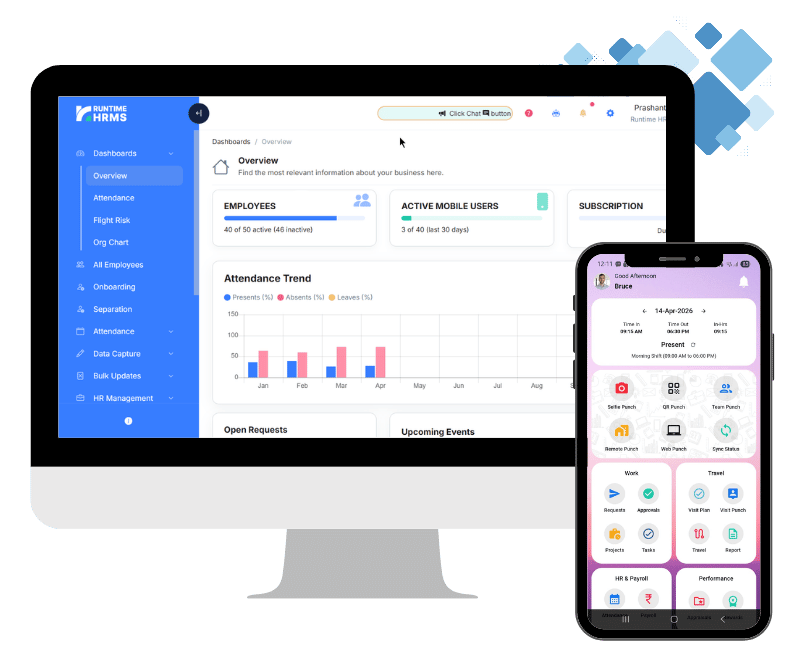
- Payroll. Runtime Payroll calculates salary, PF, ESI, Professional Tax and TDS from attendance and leave data, and can generate the monthly ESI contribution file and the PF ECR file for upload on the portals.
- Attendance with geo-tagging. Geo-fencing for sites and offices, geo-tagged remote punch for field staff, QR and web punch, shift rostering and automatic overtime.
- Multiple locations. Attendance for several branches or sites, with a separate holiday list for each location.
- Employee self-service. Employees see payslips and leave and request corrections through Workman.
- Hiring (ATS). Track applicants through to joining.
- Support. Runtime’s team handles product demonstrations, onboarding, implementation and customer support. It can also handle account setup and training.
Who pays for the licence
In most cases the client pays Runtime directly. If you have the client’s authority to pay on its behalf, you can do that too. Because every client company is a separate subscription, the number of licences grows with the number of companies you run. If you manage many or large companies, tell the Runtime team about your setup, and they will discuss options with you.
How the payroll software for consultants partner program pays
Using Runtime for your clients also makes you eligible for the Runtime Partner Program. It is free to join, and it pays you in addition to your service fee.
You earn a percentage of the subscription amount each company pays Runtime, and you keep earning on renewals.
| Company’s subscription | Your commission |
|---|---|
| Years 1 and 2 | 20% |
| Years 3 and 4 | 10% |
| Year 5 onwards | 5%, for the lifetime of the subscription |
For every ₹1,00,000 a company pays Runtime in its first year, you earn ₹20,000. In years 3 and 4 you earn ₹10,000 on the same amount, and from year 5 you earn ₹5,000.
- Commission on every company you onboard, once its bill is paid, including companies whose payroll you run.
- Calculated on what is collected. The base is the actual subscription amount collected, excluding taxes, refunds, credits and promotional adjustments.
- Payable after 30 days. Commission becomes payable once the company has completed 30 days of paid subscription and all payments are received.
- Paid by the 7th. Commission earned in a calendar month is paid on or before the 7th of the following month, to your registered bank account.
- Track it yourself. The partner dashboard shows referral status, earnings and payouts.
Earnings are not guaranteed. They depend on how many companies subscribe and how long they stay.
Apart from commission: incentive programs
Apart from commission, Runtime also runs incentive programs from time to time. The offers change, so check with the Runtime team for the latest incentive program when you join.
Two income streams, one client
Payroll software for consultants changes the maths of a client. A consultant earns twice from a single client company:
- Your service fee for running the client’s payroll, which is yours to set.
- Commission from Runtime on the client’s subscription.
And the time you save on each client lets you take on more clients within the same hours.
The statutory points to check for each client
| Area | What to check for each client |
|---|---|
| PF | Applies from 20 employees. Wage ceiling ₹25,000 from 17 Sep 2026. |
| ESI | From 10 employees (20 in some states), wage limit ₹21,000. |
| Wage deadline | Before the 7th of the next month. Full and final settlement within two working days. |
| Deductions | Capped at 50% of wages in a wage period under the Code on Wages. |
| Bonus | Eligibility up to ₹21,000 a month, payable within eight months of the year end (30 November for a March year end). |
| Professional Tax | Depends on each client’s state. |
Rules of the payroll software for consultants partner program
- Commission is paid only for new customers. Existing Runtime HRMS customers and companies already in an active sales process with Runtime do not qualify.
- A referral counts only if no other partner referred the same company in the previous 30 days. If several partners refer the same company, the earliest valid referral gets the credit.
- Runtime may reject referrals and withhold commission in cases of fraud, inaccurate information or misrepresentation.
- Runtime has the sole right to decide pricing, discounts, commercial terms and whether to accept a referred company. A referral does not guarantee a sale or commission.
- Runtime may modify, suspend or end the program at any time. Commission already earned and approved is not affected.
Read the full Partnership Terms before you refer anyone. Recommend Runtime only where it suits the client, and tell the client you are a Runtime partner.
How to join the payroll software for consultants partner program
- Apply for free. Log in to the Runtime account portal, complete the partner registration form with your professional details, and wait for review.
- Get approved. You receive a partner account and referral tools.
- Set up your clients. Create each company’s account from your single login, or submit referrals on the Referrals page.
- Get paid. Track earnings and upcoming payouts in your dashboard.
Your problem, and how Runtime’s payroll software for consultants helps
| What you are dealing with | What changes |
|---|---|
| Every client has different rules | A separate account for each company, so data and rules stay separate. |
| Logging in and out for each client | All company accounts managed from a single login. |
| Late, messy attendance data | Geo-tagged punches, several punch options and a record for each location. |
| PF and ESI filings built by hand | Statutory deductions with the salary, plus the monthly ESI file and PF ECR file. |
| Employees asking you for payslips | Employees see payslips and raise requests themselves in Workman. |
| Each new client taking a full day | Runtime’s team handles onboarding, implementation and support. |
| Income that only grows with your hours | Your service fee plus recurring commission on each company. |
Run payroll for many companies? Earn from every one.
Join the Runtime Partner Program free, set up your first client and earn commission every month it stays.
Apply as a PartnerFAQs
What should payroll software for consultants include?
Separate accounts for each client company, one login to manage them, salary with PF, ESI, Professional Tax and TDS, filing files, attendance in one format, employee self-service and real onboarding support.
Is payroll software for consultants worth it?
If you run payroll for more than a few companies, usually yes. It cuts the hours spent on each client every month, and the same hours can then serve more clients. Whether it pays off for you depends on your client count and what you charge.
Can I manage several client companies from one login?
Yes. Create a separate account for each company and manage them all from one login. Each company needs its own licence, because every company has its own data and payroll rules.
Who pays for each licence?
Usually the client, directly. You can pay on its behalf if the client authorises you.
Do I earn commission on the companies whose payroll I run?
Yes. You earn commission on every company you onboard once its bill is paid.