
Quick Answer
Payroll software for startups should cost almost nothing at 5 people, work for a team that is not always in one office, and add PF, ESI and TDS when you grow. Look for a free or low starting plan, remote attendance, and per-employee pricing that scales with you.
Runtime Payroll is free for up to 5 employees, supports geo-tagged remote punch, and paid plans are priced per employee per month. You can try a test payroll before you commit.
When a startup is three people, payroll is a transfer on the 1st. At eight, it is a spreadsheet the founder updates at night. At fifteen, it is a CA’s email asking for attendance, and a new hire asking for a payslip you do not have a template for.
None of this is hard. It just shows up before you have anyone to own it. This guide is for founders choosing payroll software for a startup. It covers what you need at each stage, what it costs, and how remote punch works for a team that is not always in the office. I am not a CA, so check specifics with yours.
Is this you?
Read these six. If you nodded three times, keep reading, because this is how most startup payroll problems begin.
- It is 11 pm on the 29th, and you are checking the salary sheet for the second time. You copied last month’s file, changed the joiners, deleted the leavers and fixed the leave. One wrong cell and somebody’s salary is off. You will not know until they message you, and by then it is not a spreadsheet error. It is a trust problem, and the first one your team will remember.
- Nobody told you when the rules start. ESI arrives at 10 employees in most states. PF arrives at 20. TDS depends on who earns what. None of these comes with a notification. You find out from your CA, from a client asking for your PF code, or from a notice. By then you may owe months of contributions and interest. See what changes after hiring 20 employees.
- Your team is not in one room. Two people work from home, one is on the road and the intern comes in on Tuesdays. Attendance is a message in the group chat, and at month end you are asking “were you in on the 14th?” Nobody likes that conversation, you or them.
- The month does not stay still. Someone joins on the 11th. Someone leaves on the 22nd. You work out part-month salary by hand, with a calculator and a guess about which days count. It is rarely wrong by much, but the person it is wrong for remembers.
- Only one person knows how payroll works. It is you, or your accountant, or the one person who built the sheet. If they are on leave, ill or gone, payroll waits. Most startups only see this risk the week it happens.
- You are not sure the tool is worth paying for. At five people every monthly bill gets questioned. That is fair. But the real comparison is not the software against nothing. It is the software against your own hours.
The cost you do not see on an invoice
Suppose payroll takes you six hours a month, including attendance, leave, part-month salary, payslips and checking. That is 72 hours a year, or nine working days of a founder’s time. [ADD: your own estimate or a customer’s. Use a real number if you have one.]
Those nine days are not spent building the product, talking to customers or hiring the next person. And that is the cost when nothing goes wrong. When something does, the cost is higher: a correction, an awkward conversation, a notice with interest on it. See what to do about a PF or ESI notice.
Why payroll software for startups matters, even at 5 people
I will be honest first. At two or three people, a spreadsheet works. Many good companies started that way. The question is not whether Excel can do it. It is when Excel stops being the safe choice.
1. Payroll is the first promise you keep. Salary on time, every month, with a payslip that is right, is how a new team decides whether to trust you. Good software makes that routine, so you are not depending on a late-night check.
2. Rules switch on without warning. ESI, PF, Professional Tax, bonus and gratuity all start at headcounts and salary levels, and some depend on your state. Software with statutory rules built in applies them as you grow, so you are not tracking a calendar of thresholds in your head.
3. Records are asked for sooner than you expect. A bank, an investor, a visa office, a landlord or a new employee’s home loan all ask for payslips and proof of PF. If your records are in a spreadsheet and some emails, assembling them takes days. In software it is a report.
4. Spreadsheets break quietly. A formula dragged one row too far, a column overwritten, an old file opened by mistake. None of these shows an error. They show a wrong number.
5. Your team changes faster than your process. Joiners, exits, remote staff, interns and freelancers arrive in months, not years. Software that handles onboarding, attendance, leave and exits in one place means the process grows with the team and you do not rebuild it at 20.
6. Switching later costs more. Moving from Excel at 40 people means cleaning years of files, mapping salary structures and running two systems side by side. Starting small with software costs less than that move.
When Excel stops being enough
| If this is true | Then |
|---|---|
| Two or three people, one location, no PF or ESI | A spreadsheet is fine. Keep a clean template. |
| Any remote or field staff | Attendance needs a proper record. Time to switch. |
| You are close to 10 employees | ESI is coming. Set up payroll before it starts. |
| You are close to 20 employees | PF and bonus are coming. Do not wait for the first deadline. |
| An investor, bank or auditor asks for records | You need records on demand, not in a week. |
| You have had a payroll mistake or a notice | The next one costs more. Fix the process now. |
What payroll software for startups should do
If the reasons above fit, here is what to look for. Not every tool is right for a startup.
- A free or very cheap start. At 3 to 5 people, a large monthly bill is hard to justify.
- Payslips and salary records that look professional from the first month. Investors and banks may ask.
- Attendance that works for remote and hybrid teams. A fingerprint machine does not help if half the team works from home.
- Statutory deductions that switch on as you grow. ESI at 10 employees and PF at 20, in most states.
- TDS and Form 16 handling when salaries cross the taxable limit.
- A way to grow without migrating. Moving payroll at 40 people is painful. It is better to pick software that stretches.
Pricing: What A Payroll Software For Startups Costs
Runtime is priced per employee per month, so the bill grows with your team and you never pay for headcount you do not have. Runtime is free for up to 5 employees. Every plan includes:
- Attendance with geo-fencing
- Employee onboarding and separation
- Leave management
- Payroll and compliances
- A 7-day free trial
Some features, such as income tax (TDS) compliance, shift rostering and biometric integration, depend on the plan you pick. The pricing page shows what each plan includes and what it costs today.
See current plans and prices
Plans and prices are always up to date on the pricing page.
View PricingRemote punch: attendance for a team that is not in one place
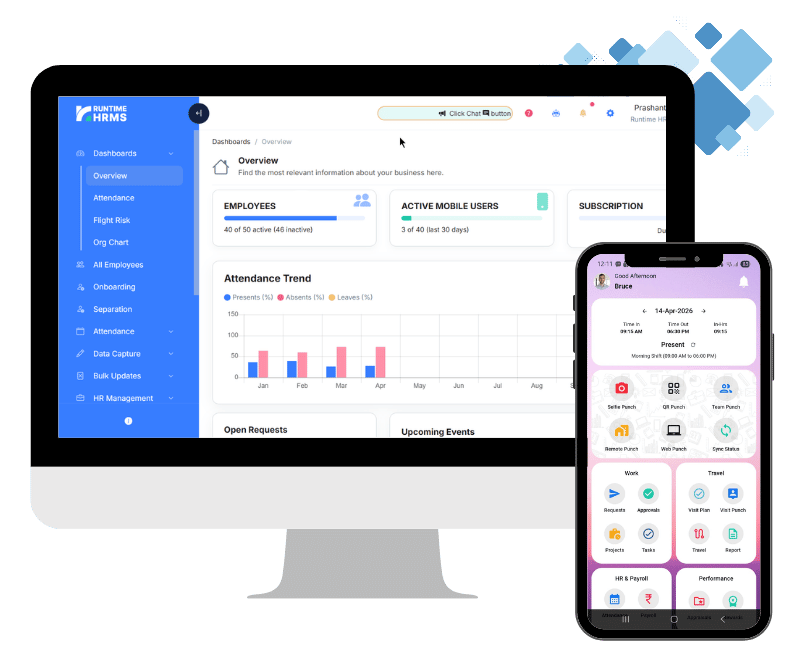
A biometric machine is no use to someone working from home. Runtime’s remote punch lets remote workers and field executives submit geo-tagged punches from any location, and shows where each punch came from.
There are a few ways to mark attendance, depending on your team:
- Remote punch. Geo-tagged, for remote and field staff.
- QR punch. For the office, with geo-fencing tied to each office location.
- Selfie punch through the Workman app, with face recognition. HR enables it per employee or in bulk, and each person registers their face in the app.
- Web punch. For places where geo-fencing is not needed.
Attendance with geo-fencing is included in every plan. You can also set punches to be allowed only from the employee’s location. The reason these matters for a startup is trust without micromanaging. The founder sees who has started the day and where and does not need to ask in chat every morning.
What to ask before you choose you choose payroll software for startups
- Can I run a test payroll on my own people before I pay?
- What happens at 10 and 20 employees? Does ESI or PF switch on without a rebuild?
- Can my team punch from home or on the road?
- Are TDS and Form 16 included, or a higher plan?
- Can I export my data if I leave?
- Who answers when payroll is due and something looks wrong?
Runtime has a 7-day free trial with no credit card. Use it with your own salaries, not a demo list.
Your sheet works for 5 people. What about 15?
Spreadsheets break when you add people, locations and rules. Start free and see payroll, attendance and PF/ESI in one place.
Start FreeA simple roadmap as you grow
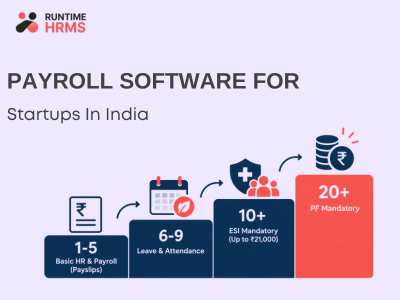
| Team size | What to set up |
|---|---|
| 1 to 5 | Payslips, offer letters, attendance. Professional Tax if your state has it. |
| 6 to 9 | Leave rules, a payroll calendar, TDS for higher salaries. |
| 10 or more | ESI for staff earning up to ₹21,000, in most states. Gratuity. A POSH committee. |
| 20 or more | PF (wage ceiling ₹25,000) and statutory bonus . |
How Runtime fits as payroll software for startups
Runtime Payroll runs salary and statutory deductions together, and time and attendance and the Workman app put punches and payslips on each person’s phone. Onboarding keeps new-joiner records in one place from day one. You start small and move up a plan as you need more features.
Your problem, and what Runtime does about it
| What you are dealing with | What Runtime does |
|---|---|
| Salaries on Excel every month, checked twice | Payroll and payslips from one run, with statutory deductions calculated with the salary. |
| Not sure when ESI, PF and TDS start | PF, ESI, Professional Tax, Labour Welfare Fund, gratuity and bonus. TDS and income tax compliance depend on the plan, see the pricing page. |
| A remote or field team with no way to track attendance | Geo-tagged remote punch, with selfie punch through the Workman app. |
| Joiners and exits mid-month | Onboarding and separation are in all plans, so records are in one place. |
| Only one person knows payroll | Employee self-service gives each person their own payslips and leave, and records sit in one system. |
| Cost worries at a small team size | Free for up to 5 employees , then per-employee pricing. |
Small Team? Start with Free Payroll.
Manage payroll, leave and remote attendance with Runtime HRMS. Free for up to 5 employees.
Start Free →FAQs
Is there free payroll software for startups in India?
Runtime offers a free plan for up to 5 employees. It also has a 7-day free trial on paid plans, with no credit card.
How much does payroll software cost for a startup?
Runtime is priced per employee per month and is free for up to 5 employees.
Does payroll software handle remote employees?
Yes. Remote punch lets remote and field staff submit geo-tagged punches from any location.
When do I need PF and ESI as a startup?
ESI generally applies from 10 employees, for staff earning up to ₹21,000. PF applies from 20 employees. Some states differ.
Can I switch plans as the team grows?
Yes, you can move up a plan when you need more features.