
Quick Answer
Payroll software for CAs from Runtime HRMS comes with a free-to-join partner program. You earn recurring commission on every client company you bring: 20% of the subscription in years 1 and 2, 10% in years 3 and 4, and 5% from year 5 for the lifetime of the subscription.
You can simply refer a client, or set up and run the client’s payroll yourself. Runtime’s team handles the demo, onboarding and support, and the commission is paid by the 7th of the month after the client’s first 30 paid days.
You are a CA. You file returns, close books and answer notices. But for many small-business clients you are also the person they call about payroll. A wage counted wrongly for PF. A new joiner missed for ESI. A challan paid late. They run salary in Excel or on paper, and the problem reaches you after the damage is done.
This guide is for CAs (chartered accountants) and accounting firms. It explains what manual payroll costs your practice, how Runtime’s payroll software for CAs and its partner program work, how much you can earn, and what it asks of you. I am a director at Runtime HRMS, so I will be plain about what the program does and does not offer. I am not a CA, so check legal points against your own records.
What clients running payroll in Excel cost your practice
If three of these feel familiar, the cause is not your skill. It is how your clients run payroll, and it is the gap payroll software for CAs is built to close.
- Wrong wages reach you as notices. A client uses the wrong wage for PF, misses a new joiner, or pays late. The notice lands on your desk. See what to do on a PF or ESI notice.
- Data reaches you late and messy. Attendance in a photo, salaries in an Excel with merged cells, and a “please file today” call on the 14th.
- Small clients take large time. A 15-employee client pays a small fee but takes hours of back-and-forth.
- You are the client’s helpdesk. Duplicate payslips, bank-account changes, “can you check this deduction”. These are HR tasks, but they come to you.
- Clients cross thresholds without noticing. ESI starts at 10 employees (20 in some states) and PF at 20. The client crosses it quietly and you find out when the first notice arrives. See what to do after hiring 20 employees.
- Your advice earns nothing. You recommend accounting software, GST tools and banks all the time. Payroll software is one more place where your word decides what a client buys, and today it pays you nothing.
What this costs you
Suppose five clients each cost you 3 extra hours a month in corrections, follow-ups and notices. That is 15 hours a month, or 180 hours a year, spent on problems a proper system would remove. That is time you could bill, or spend on advisory work. It is the cost payroll software for CAs helps you reduce.
Why payroll software for CAs fits a practice
Your clients already ask you which software to buy. Payroll software for CAs, with a partner program attached, turns that advice into something that helps three people: the client gets a proper system, you get cleaner data and fewer corrections, and you earn recurring commission while the subscription continues. It asks for no investment, and you do not need to become a software seller. You need only recommend what fits.
Three ways CAs earn with Runtime
1. Refer and earn. Introduce a client to Runtime. The client subscribes, and you earn commission. Nothing else changes in your work.
2. Run the client’s payroll. Set up the client’s Runtime account and run the payroll yourself as your service. You keep your service fee and also earn commission. Commission is earned on every company you onboard once its bill is paid, including companies whose payroll you run.
3. Do both. Many partners refer some clients and run payroll for others.
How the payroll software for CAs partner program pays
You earn a percentage of the subscription amount each client company pays Runtime, and you keep earning on renewals.
| Client’s subscription | Your commission |
|---|---|
| Years 1 and 2 | 20% |
| Years 3 and 4 | 10% |
| Year 5 onwards | 5%, for the lifetime of the subscription |
In simple terms: for every ₹1,00,000 a client pays Runtime in its first year, you earn ₹20,000. In years 3 and 4 you earn ₹10,000 on the same amount, and from year 5 you earn ₹5,000.
- Calculated on what is collected. Commission is based on the actual subscription amount collected from the client, excluding taxes, refunds, credits and promotional adjustments.
- Payable after 30 days. Commission becomes payable once the client has completed 30 days of paid subscription and all payments are received.
- Paid by the 7th. Commission earned in a calendar month is paid on or before the 7th of the following month, to your registered bank account.
- Track it yourself. The partner dashboard shows referral status, earnings and payouts.
Earnings are not guaranteed. They depend on how many clients subscribe and how long they stay.
Apart from commission: incentive programs
Apart from commission, Runtime also runs incentive programs from time to time. The offers change, so check with the Runtime team for the latest incentive program when you join.
Want the full partner details in one place?
See who can join, how referrals work and what Runtime handles for you.
Explore the Partner ProgramOne account and one licence per client company
Each client company needs its own Runtime account and licence. Every company has its own data and its own payroll rules, so they cannot be mixed in one payroll.
If you run payroll for several clients, you can create their accounts and manage them from a single login, opening each one separately. Every client is a separate subscription and earns its own commission.
Who pays? In most cases the client pays Runtime directly. If you have the client’s authority to pay on its behalf, you can do that too. If you manage many or large companies, tell the Runtime team about your setup, and they will discuss options with you.
What Runtime handles, so you do not have to
Runtime’s team handles product demonstrations, onboarding, implementation and customer support for the clients you bring. It can also handle account setup and training. How much you do yourself is your choice. If you only want to refer, you can introduce the client and let Runtime take it from there. That support is part of what makes payroll software for CAs practical for a busy practice.
What to tell a client who asks which payroll software to buy
This checklist works whether or not the client picks Runtime, and it gives your recommendation a clear basis.
- One place for attendance, leave and salary, so payroll does not start with converting data.
- PF, ESI, Professional Tax and TDS in the same run.
- Geo-tagged attendance, so a punch shows where it was made, with geo-fencing for sites and offices and remote punch for field and work-from-home staff.
- Multi-location attendance, with a separate holiday list and records for each branch or site, so one client with several locations does not need several spreadsheets.
- Employee self-service, so staff see payslips and request corrections themselves.
- Rules for the client’s actual shifts and overtime.
- Hiring in the same system, such as an applicant tracking system (ATS) that follows a candidate from application to joining, so the new employee’s details flow into onboarding and payroll.
- Updates when the law changes, such as the EPF wage ceiling moving to ₹25,000 from 17 September 2026 and the Labour Codes in force since 21 November 2025.
- Real onboarding and support, because the owner has no time to learn a tool alone.
| Area | What to check for each client |
|---|---|
| PF | Applies from 20 employees. Wage ceiling ₹25,000 from 17 Sep 2026. |
| ESI | From 10 employees (20 in some states), wage limit ₹21,000. |
| Wage deadline | Before the 7th of the next month. Full and final settlement within two working days. |
| Deductions | Capped at 50% of wages in a wage period under the Code on Wages. |
| Bonus and gratuity | Statutory bonus eligibility up to ₹21,000 a month, payable within eight months of the year end. Gratuity from 10 employees. |
| Professional Tax | Depends on the client’s state. |
Rules of the payroll software for CAs partner program
- Commission is paid only for new customers. Existing Runtime HRMS customers and companies already in an active sales process with Runtime do not qualify.
- A referral counts only if no other partner referred the same company in the previous 30 days. If several partners refer the same company, the earliest valid referral gets the credit.
- Runtime may reject referrals and withhold commission in cases of fraud, inaccurate information or misrepresentation.
- Runtime has the sole right to decide pricing, discounts, commercial terms and whether to accept a referred company. A referral does not guarantee a sale or commission.
- Runtime may modify, suspend or end the program at any time. Commission already earned and approved is not affected.
Read the full Partnership Terms before you refer anyone.
A note on referring well: recommend Runtime only to clients it suits, and tell the client you are a Runtime partner. Your credibility with a client is worth more than any commission.
How to join the payroll software for CAs partner program, step by step
- Apply for free. Log in to the Runtime account portal, complete the partner registration form with your professional details, and wait for review.
- Get approved. You receive a partner account and referral tools.
- Refer or onboard. Submit a referral on the Referrals page, or set up a client’s account yourself.
- Get paid. Track earnings and upcoming payouts in your dashboard.
Your situation and what payroll software for CAs changes
| What you are dealing with | What changes |
|---|---|
| Clients on Excel making wage and challan errors | Statutory deductions calculated with salary in one run. |
| Late, messy attendance data | Attendance recorded in one system with geo-tagged punches, several punch options and a record for each location. |
| You acting as the client’s HR helpdesk | Employees see payslips and raise requests themselves in Workman. |
| Onboarding and support landing on you | Runtime’s team handles onboarding, implementation and support. |
| Several clients, each with its own rules | A separate account for each company, all managed from one login. |
| Earning nothing from payroll advice | Recurring commission on referred clients’ paid subscriptions. |
What your client gets with Runtime
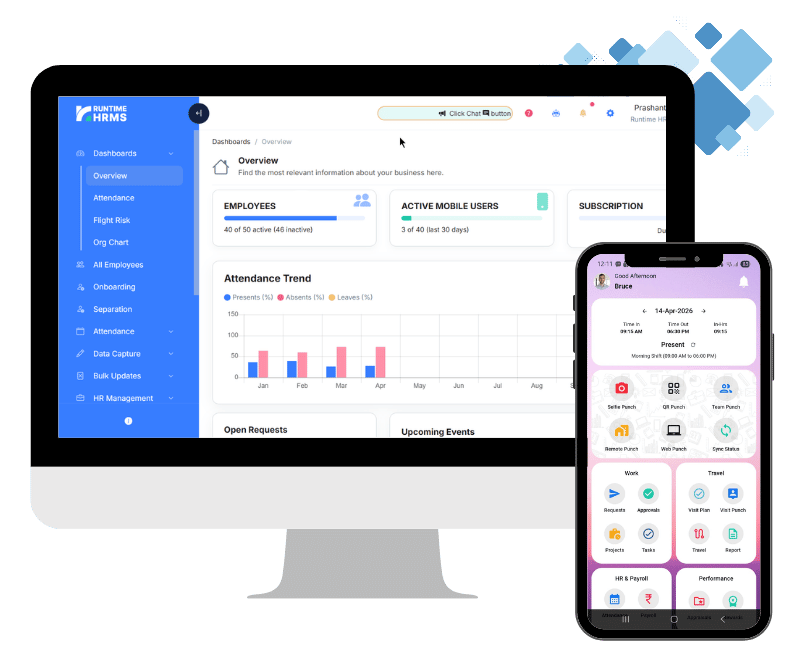
Runtime Payroll calculates salary, PF, ESI, Professional Tax and TDS from attendance and leave data. It can generate the monthly ESI contribution file and the PF ECR file for upload on the portals.
- Attendance with geo-tagging. Time and attendance with geo-fencing, geo-tagged remote punch for field and remote staff, QR and web punch, shift rostering and automatic overtime.
- Multiple locations. Attendance for several branches or sites, with a separate holiday list for each location.
- Hiring (ATS). Track applicants through to joining.
- Employee self-service. Employees see payslips and leave and request corrections through Workman.
- Onboarding and separation. Joining and exit records in one place.
See the pricing page for plans.
Turn client payroll advice into recurring income
Join the Runtime Partner Program free, bring your first client and earn commission every month it stays.
Apply as a PartnerFAQs
What is the Runtime payroll software for CAs partner program?
It lets CAs and chartered accountant firms, payroll consultants, HR professionals and business advisors refer new companies to Runtime HRMS and earn recurring commission on their paid subscriptions. Joining is free and applications are reviewed.
Is payroll software for CAs worth it for a practice?
If your clients run payroll in Excel and bring the errors to you, yes. Payroll software for CAs reduces your own workload, and joining the partner program is free and pays commission on clients who subscribe.
How much commission does a CA earn?
20% of the subscription amount in years 1 and 2 of a client’s subscription, 10% in years 3 and 4, and 5% from year 5 for the lifetime of the subscription. It is calculated on the amount actually collected, excluding taxes, refunds and credits.
When is commission paid?
Once the client has completed 30 days of paid subscription and all payments are received. Commission earned in a month is paid on or before the 7th of the following month.